← ERMAK-TT User Manual
ABOUT window
ABOUT window: hardware and software versions, serial number and network data of the transceiver.
To open the ABOUT window, long press the button 1
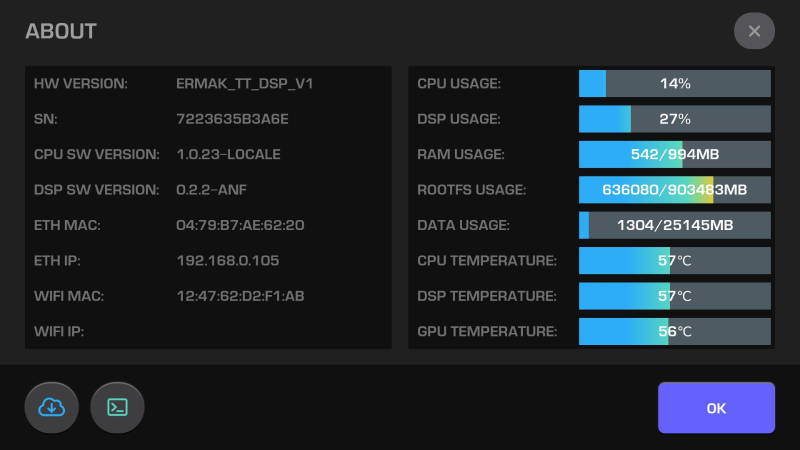
- HW version — hardware version
- SN — serial number
- CPU SW version — software version of the central processor
- DSP SW version — software version of the digital signal processor
- ETH MAC — MAC address of the 1 Gbit/s wired interface
- ETH IP — IP address of the 1 Gbit/s wired interface
- WIFI MAC — MAC address of the WiFi wireless interface
- WIFI IP — IP address of the WiFi wireless interface
- CPU usage — central processor load, updated every second
- DSP usage — DSP load, updated every second
- RAM usage — used size and total size of the RAM, updated every second
- ROOTFS usage — used size and total size of the ROOTFS file system, updated every second
- DATA usage — used size and total size of the EMMC DATA partition, updated every second
- CPU temperature — central processor temperature, updated every second
- DSP temperature — DSP temperature, updated every second
- GPU temperature — graphics processor temperature, updated every second
To close the ABOUT window, press the button OK or X
Online software update check
To check for online updates, press the button 
Go to the console window
To open the TERMINAL window, press the button