




APF (automatic peak filter) adjustment
APF (Automatic Peak Filter) is an automatic peak filter used to improve the reception of weak CW signals in noisy and interfering conditions. This filter selects a narrow frequency band around the useful signal, improving its audibility and reducing the level of interfering signals.
Main functions of APF:
- Noise suppression: Reduces the effect of broadband noise and interference by isolating a narrow frequency range.
- Improved CW signal intelligibility: Particularly useful in radio communication using telegraph code (CW), where accurate recognition of subtle audio signals is critical.
- Automatic tuning: APF automatically adjusts to the frequency of the maximum peak of the useful signal, which is convenient in variable conditions (e.g., frequency drift).
- Narrow bandwidth: Ensures signal isolation even in conditions of strong interference, for example, when receiving amateur radio signals in contests or when operating in bands with a high density of transmitting stations.
To turn the APF on/off, press the button. APF
To open the settings window, press and hold the button. APF
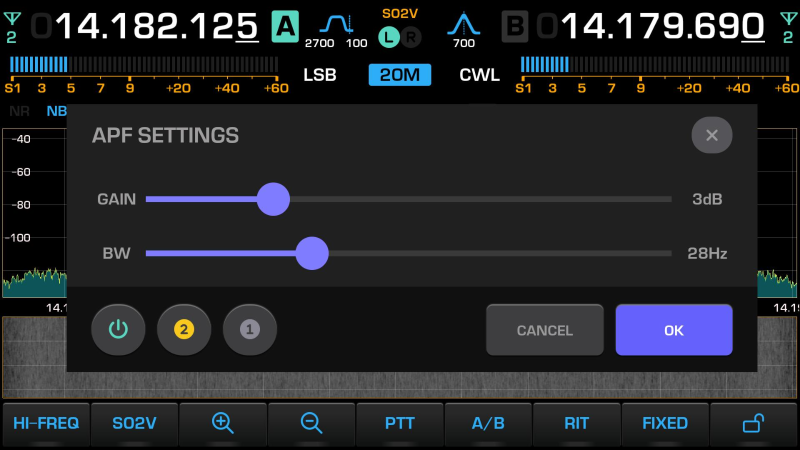
To exit the APF settings window, press the button. OK
Enabling/disabling APF in the settings window
To turn the APF on/off, press the button. 
GAIN adjustment - APF filter gain level
The GAIN level can be adjusted using the touchscreen or encoder. AF
Adjusting BW - the bandwidth of the APF filter
The filter bandwidth can be adjusted using the touchscreen or the lower encoder. MF
Choosing the type of APF filter implementation
There are two implementations of the APF filter in the digital domain with different impulse and transient characteristics.
To select a specific implementation, press the button.  or
or 