





Program windows
Program windows
What every EAX button, meter and setting means.
On this page
Main window
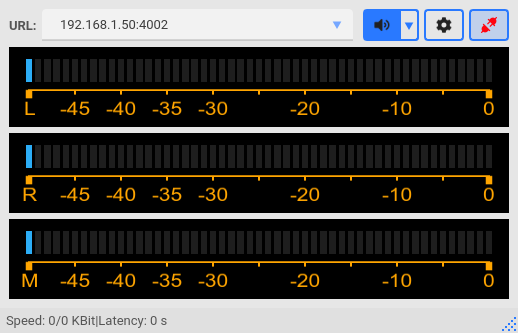
URL field — the transceiver address and port 4002, for example 192.168.1.50:4002. EAX remembers the addresses it connected to. To remove an address: right-click the field → Delete RIG's URL..
Buttons on the right:
 — connect to the transceiver or disconnect. Red means not connected.
 — turn audio on the computer speakers on or off. The arrow next to it selects the receiver.
 — settings. Available only when EAX is not connected.
Meters:
- L — RX1 receiver level;
- R — RX2 receiver level;
- M — transmit level: the audio EAX sends to the transceiver.
Status line
The status line shows whether audio is flowing. This is how it looks with a working connection:
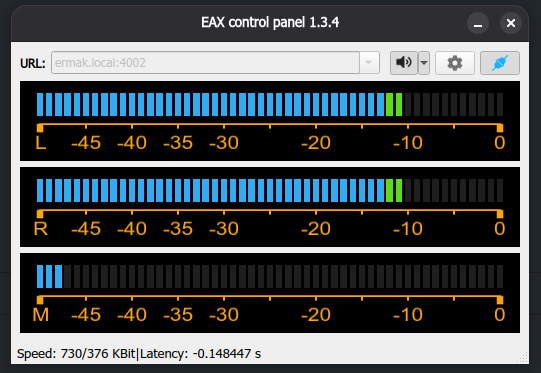
Connected: Speed 730/376 kbit/s, the L and R meters show the receive level.
- Speed, first number — receive rate: how much audio arrives from the transceiver, in kilobits per second.
- Speed, second number — transmit rate: how much audio EAX sends to the transceiver.
- Latency — the computer audio buffer delay, in seconds. It grows when you increase the buffers in settings.
The values are updated every 2 seconds.
| What you see | What it means |
|---|---|
| Both numbers above zero | Everything works: audio flows both ways |
| First number is 0 | Audio from the transceiver does not arrive. Most often — wrong Local IP address or a firewall. How to fix |
| First number below 200 and jumping | The network cannot keep up, the audio will drop out. Check Wi-Fi |
| Reconnecting in N s... | The connection dropped, EAX reconnects by itself in N seconds |
If receive stays below 200 kbit/s for about 10 seconds, EAX treats the connection as lost, disconnects and shows Lost connection with Rig.
Listen to the bands on the computer
- Connect to the transceiver.
- Click .
- To select a receiver, click the arrow to the right of this button.
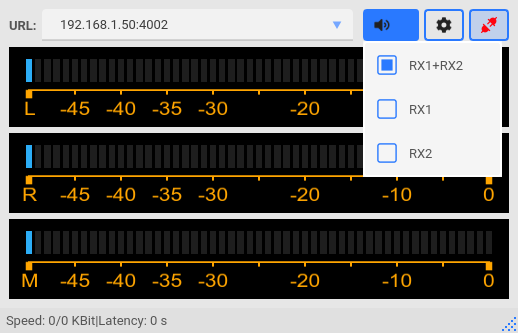
- RX1+RX2 — both receivers: RX1 in the left ear, RX2 in the right.
- RX1 — first receiver only, in both ears.
- RX2 — second receiver only, in both ears.
The choice affects only the speakers. Digital mode programs always get both receivers.
Settings window
Click , change the parameters and click OK.
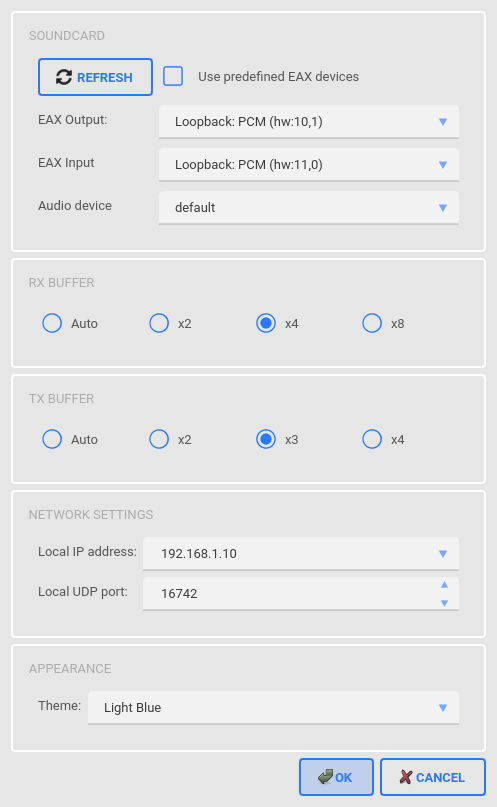
Audio devices
EAX Output — the virtual card for receive. EAX sends the transceiver audio here.
EAX Input — the virtual card for transmit. EAX takes audio from here and sends it to the transceiver.
Audio device — your speakers or headphones.
Which devices to select is shown on the diagrams in the guides for Linux and Windows.
EAX reads the device list at startup. If a device is missing, close EAX and start it again.
RX and TX buffers
The audio reserve size. Auto gives the lowest latency. If the audio drops out — usually on Wi-Fi — select x4 or x8.
Network
Local IP address — the IP address of your computer on the same network as the transceiver. The transceiver sends audio to exactly this address.
This is the most important setting. The first three numbers of the computer and transceiver addresses must match: transceiver 192.168.1.50 → computer 192.168.1.10. On first start it shows 127.0.0.1 — audio does not work with it. Details: why the IP address matters.
Local UDP port — the port the audio arrives on. Leave 16742.
Appearance
Theme — the window colour: System Default, Dark Teal, Dark Amber, Dark Cyan or Light Blue.
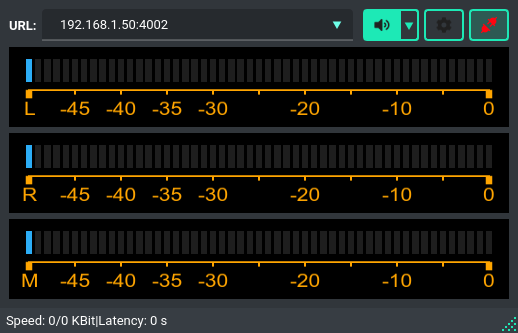
Dark Teal theme.
If the connection drops
EAX reconnects by itself: first after a second, then less often, up to once every 30 seconds. The status line shows Reconnecting in N s...
On Windows EAX also works from the tray — see “Working from the tray” in the Windows guide.