





Installation and setup on Linux
Installing EAX on Linux
How to install EAX, create the virtual sound cards and make your first FT8 QSO. Fedora 38–44 and Ubuntu 20.04–24.04, about 15 minutes.
What you need
- The ERMAK-TT transceiver is connected to the router and the EAX interface is enabled. You know its IP address.
- A Linux computer on the same network.
- The administrator password for sudo commands.
- For digital modes — JTDX or WSJT-X installed.
Steps
Install EAX
Download the package for your system:
Open a terminal in the folder with the downloaded file and install the package:
Ubuntu
Fedora
Check: EAX Control appears in the application menu.
Create the virtual sound cards
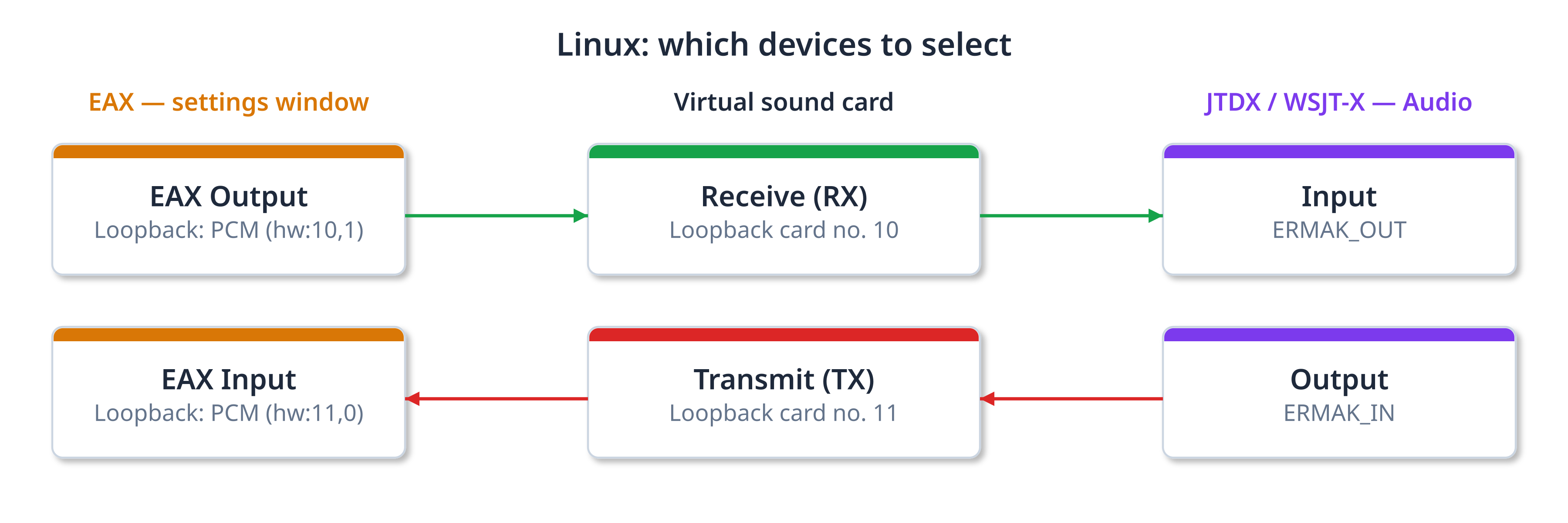
A virtual sound card is a “cable” inside the computer: EAX sends audio into it, and JTDX or WSJT-X receive it. On Linux the snd-aloop module creates such cards. You need two cards: no. 10 for receive and no. 11 for transmit.
Paste these three commands into the terminal. They configure the cards and enable them at once, no reboot needed:
echo "snd-aloop" | sudo tee /etc/modules-load.d/snd-aloop.conf
sudo modprobe snd-aloop
Check: aplay -l | grep Loopback shows 4 lines — cards 10 and 11, two devices each.
Add names for digital mode programs
This command creates two devices with clear names — ERMAK_OUT and ERMAK_IN. You will select them in JTDX or WSJT-X.
pcm.ERMAK_OUT {
type plug
slave { pcm "hw:10,0,0" format S16_LE rate 48000 channels 2 }
hint { show on description "Ermak EAX VAC RX" }
}
pcm.ERMAK_IN {
type plug
slave { pcm "hw:11,1,0" format S16_LE rate 48000 channels 1 }
hint { show on description "Ermak EAX VAC TX" }
}
EOF
Do not add pcm.!default lines from old guides to ~/.asoundrc. Today PipeWire or PulseAudio manages audio on Linux, and such lines can mute audio in other programs.
Set up EAX
Start EAX and click the settings button  . Select the devices as shown:
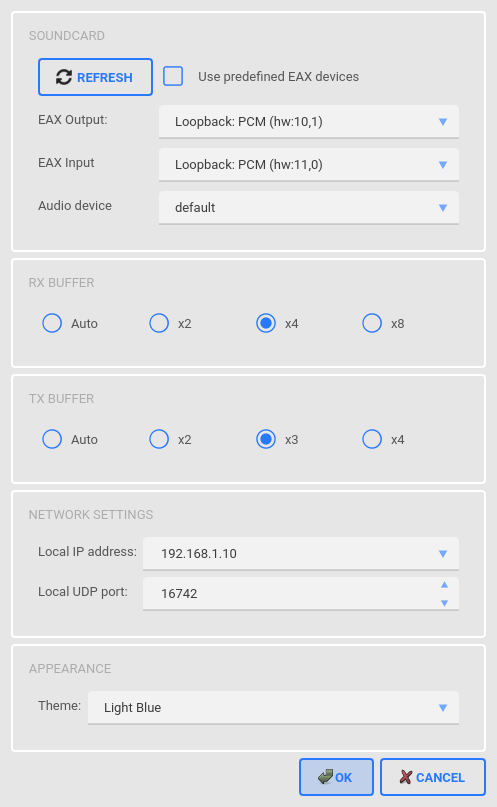
- EAX Output — Loopback: PCM (hw:10,1)
- EAX Input — Loopback: PCM (hw:11,0)
- Audio device — default: audio goes to the speakers selected in the system
- Local IP address — the computer address on the same network as the transceiver
Local IP address is the most important field. The first three numbers must match the transceiver address: 192.168.1.50 → 192.168.1.10. On first start it shows 127.0.0.1 — with it there is no audio.
Click OK.
EAX reads the list of audio devices at startup. If the Loopback cards are not in the list, close EAX and start it again.
Connect to the transceiver
- In the URL field type the transceiver address and port 4002, for example 192.168.1.50:4002.
- Click
 .
Check: Speed in the status line is above zero, the L and R meters move.
Set up JTDX or WSJT-X
In the program select Input — ERMAK_OUT and Output — ERMAK_IN, and on the Radio tab — Hamlib NET rigctl with the transceiver address and port 4532. This is how correct JTDX and EAX settings look together:
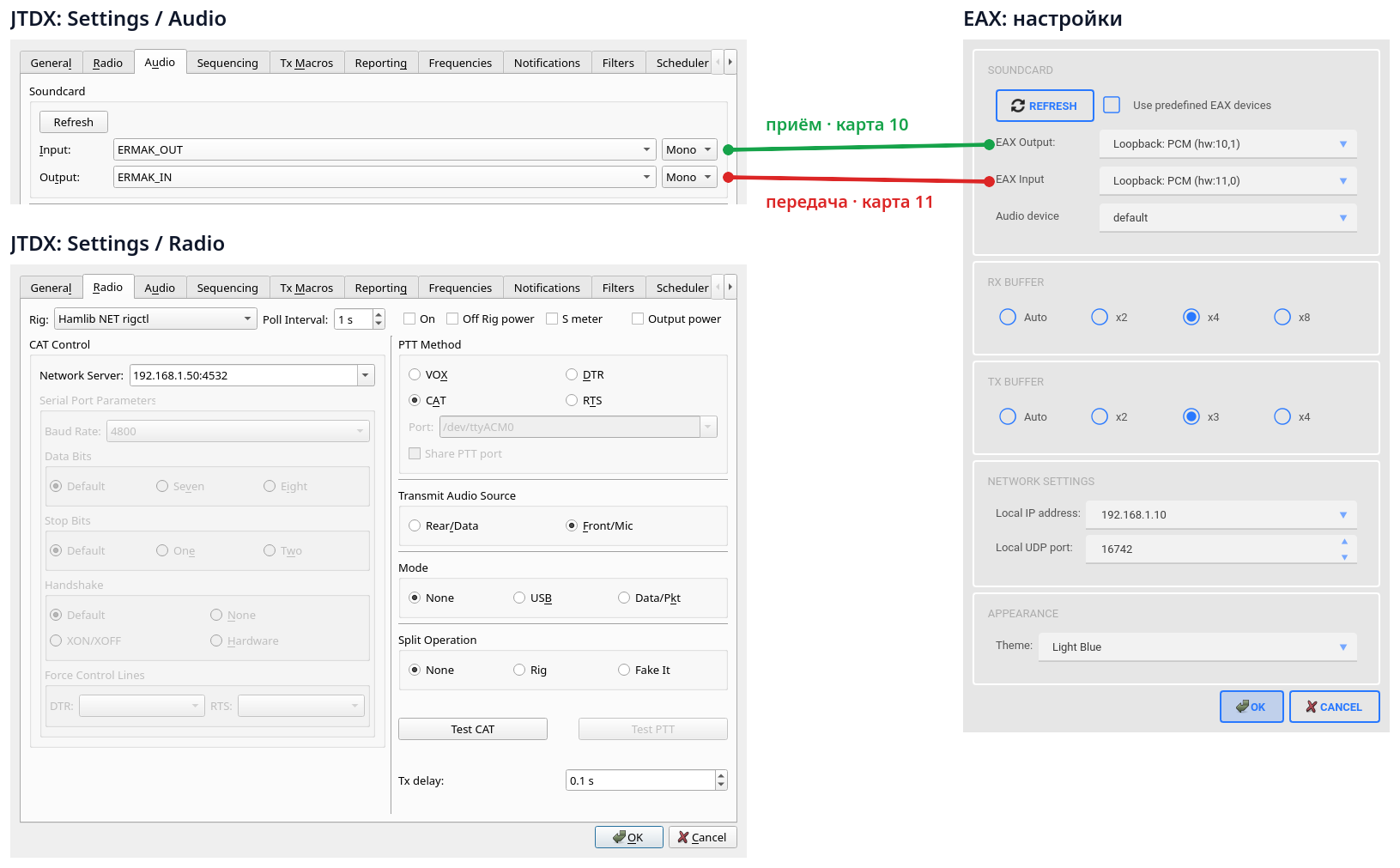
Details: JTDX and WSJT-X setup.
Check: JTDX shows decodes. You are ready for QSOs.
Summary of settings
| Program | Field | Value |
|---|---|---|
| EAX | URL | transceiver IP address:4002 |
| EAX | EAX Output | Loopback: PCM (hw:10,1) |
| EAX | EAX Input | Loopback: PCM (hw:11,0) |
| EAX | Audio device | default |
| EAX | Local IP address | computer IP address on the transceiver network |
| JTDX / WSJT-X | Input | ERMAK_OUT |
| JTDX / WSJT-X | Output | ERMAK_IN |
| JTDX / WSJT-X | Rig | Hamlib NET rigctl, transceiver IP address:4532 |