





NB (noise blanker) adjustment
NB (noise blanker) adjustment
Impulse noise blanker NB: how it works and how to adjust its settings.
NB (Noise Blanker) suppresses impulse noise. Typical sources of impulse noise are electrical appliances, car ignition systems, electric transport, lightning and other pulse sources.
How the Noise Blanker works
- Noise detection: the Noise Blanker monitors the input signal and finds short noise pulses that are much stronger than the useful signal.
- Blanking: when it detects a pulse, NB temporarily mutes the receiver or reduces its sensitivity for the duration of the pulse.
- Recovery: after the pulse, the receiver returns to normal operation.
Main benefits
- Suppression of impulse noise greatly improves the intelligibility of the signal.
- Especially useful with strong man-made noise, which is common in cities.
Limitations
- The Noise Blanker is effective only against impulse noise. If the noise is wideband or continuous, NB can be ineffective.
- Excessive use of the Noise Blanker can distort the useful signal if it looks similar to the noise.
To turn NB on or off, press the button NB
To open the settings window, long press the button NB
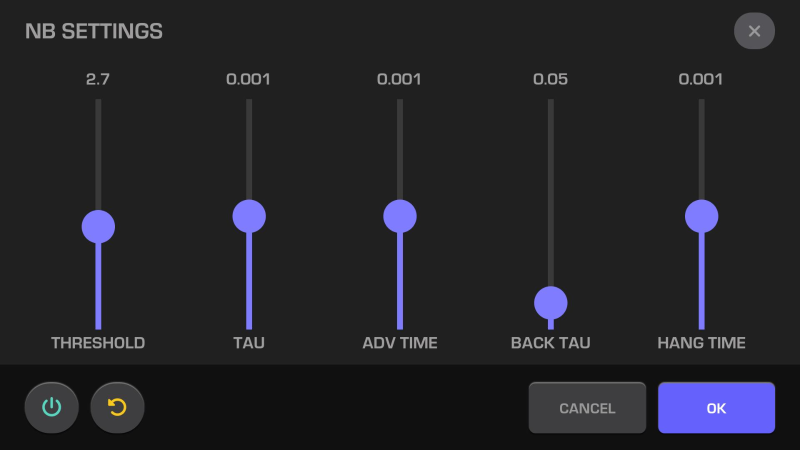
To close the NB settings window, press the button OK
To close the NB settings window without saving the changes and return to the previous values, press the button CANCEL or X
To reset to the default settings, press the button 
Turn NB on or off in the settings window
To turn NB on or off, press the button 
THRESHOLD — impulse noise blanking threshold
Adjust THRESHOLD with the touchscreen or the lower encoder MF
THRESHOLD sets the level at which the system starts to detect and blank impulse noise. It is the key parameter to match the Noise Blanker to the current band conditions.
How THRESHOLD works
- Threshold setting: you set the minimum signal level that the system treats as noise.
- Filtering: if the amplitude of the input signal is above the threshold, the Noise Blanker treats it as noise and starts blanking.
- Sensitivity: a lower threshold makes the system more sensitive, so it reacts even to weak noise. A higher threshold ignores weak noise and keeps the useful signal.
Practical use
- Low threshold: for strong impulse noise. Too high sensitivity can make the system treat the useful signal as noise.
- High threshold: for low noise, so that the useful signal is not blanked.
Effect of THRESHOLD
- Threshold too low: the Noise Blanker can blank not only noise but also part of the useful signal, and reception gets worse.
- Threshold too high: some noise that could be removed stays in the signal.
THRESHOLD setting
The best threshold depends on:
- the noise level on the band;
- the strength and structure of the useful signal;
- the operator's preference.
TAU — impulse noise blanking time
Adjust TAU with the touchscreen.
TAU sets the timing of the noise blanking: how long the Noise Blanker stays active after it detects an impulse. This parameter matches the system to the length and rate of the noise pulses.
Main purpose of TAU
- Blanking duration: TAU sets how long the Noise Blanker blanks the signal after it detects an impulse.
- Match to the noise: matches the Noise Blanker to the type and length of the noise pulses.
How TAU works
- Short TAU: the Noise Blanker turns off quickly after the pulse. Use it for short, isolated pulses.
- Long TAU: the Noise Blanker stays active longer after the pulse. Use it for long pulses or pulse trains.
Practical effect
- TAU too short:
- noise can be blanked only partly, especially long pulses;
- some pulses can pass through.
- TAU too long:
- can distort the useful signal, especially if the pulse ends quickly;
- this is noticeable when you receive weak signals in noise.
TAU setting
- Short pulses: set a low TAU to keep the effect on the useful signal small.
- Long or frequent pulses: set a higher TAU for reliable blanking.
ADV TIME — advance time of the impulse noise blanking
Adjust ADV TIME with the touchscreen.
ADV Time (Advance Time) sets the time shift of the blanking start relative to the moment the noise is detected. This makes the Noise Blanker work predictably and effectively, especially with fast impulse noise.
Main purpose of ADV Time
- Early blanking: the Noise Blanker starts blanking a little before the pulse reaches its peak, to keep its effect small.
- Compensation of system delays: takes into account the delay of the signal in the filters and processing stages of the receiver.
How ADV Time works
- Before the Noise Blanker, the signal can pass several processing stages (for example, amplification and filtering), which add a small delay. ADV Time compensates this delay and starts the blanking a little earlier.
- The Noise Blanker "looks ahead" with a signal buffer and reacts to pulses before they fully appear.
ADV Time setting
- Small ADV Time:
- the Noise Blanker can be too late to blank short pulses;
- some noise can pass through.
- Large ADV Time:
- the Noise Blanker can blank the signal before the pulse actually appears, which can affect the useful signal;
- this matters in systems where a fast reaction is critical.
Practical use
- Strong impulse noise: increase ADV Time so that the Noise Blanker reacts in advance.
- Weak or rare noise: use a smaller ADV Time to keep the effect on the useful signal small.
Best setting
- Find the ADV Time setting by experiment: watch how the Noise Blanker handles the noise and find a balance between timely reaction and signal quality.
BACK TAU — release time constant of the impulse noise blanking
Adjust BACK TAU with the touchscreen.
Back Tau (release time constant) sets how fast the system returns to normal after the noise pulse ends. It controls the "recovery" of the receiver after the blanking.
Main purpose of Back Tau
- Recovery speed: sets how long the Noise Blanker stays active after the pulse ends.
- No artifacts: prevents distortion of the useful signal caused by a too fast or too slow release of the Noise Blanker.
How Back Tau works
- Small Back Tau: the Noise Blanker releases quickly after the pulse. Use it for short, rare pulses.
- Large Back Tau: the Noise Blanker stays active longer after the pulse. Use it for repeating or "stretched" noise.
Practical effect
- Back Tau too short:
- the Noise Blanker can release too early and let part of the next pulse through;
- blanking is less effective in difficult noise conditions.
- Back Tau too long:
- the Noise Blanker can keep blanking after the noise is gone, and part of the useful signal is lost.
Back Tau setting
- Short single pulses: use a small Back Tau so that the Noise Blanker does not affect the receiver longer than needed.
- Long or repeating pulses: increase Back Tau so that the Noise Blanker handles pulse trains and decaying noise.
HANG TIME — hold time after the end of blanking
Adjust HANG TIME with the touchscreen.
HANG TIME sets how long the Noise Blanker stays active after it detects a pulse, even if the pulse is already gone. This parameter gives more stable operation with difficult or repeating noise.
Main purpose of HANG TIME
- Hold the blanking: the Noise Blanker stays active for the set time to blank repeating or decaying pulses.
- No residual noise: prevents the Noise Blanker from releasing too early while residual noise still enters the signal.
How HANG TIME works
- Short HANG TIME:
- the Noise Blanker releases quickly after the pulse;
- use it for single, short pulses.
- Long HANG TIME:
- the Noise Blanker stays active longer, even before the next pulse appears;
- use it for frequently repeating noise or pulse trains.
Practical effect
- HANG TIME too short:
- the Noise Blanker may not blank all residual noise, and the signal quality gets worse.
- HANG TIME too long:
- the Noise Blanker can keep blanking after the useful signal has returned, and part of it is lost.
HANG TIME setting
- Rare and short pulses: set the minimum HANG TIME so that the Noise Blanker does not affect the useful signal longer than needed.
- Long or repeating pulses: increase HANG TIME so that the Noise Blanker blanks pulse trains or longer noise.