




To switch to RIT (receiver tuning) or XIT (transmitter tuning) mode while in operating mode, press and hold the F7 (STEP) button for 1 second. After the drop-down menu appears, select the desired mode, RIT or XIT: A gray indicator means that the detuning is turned off.
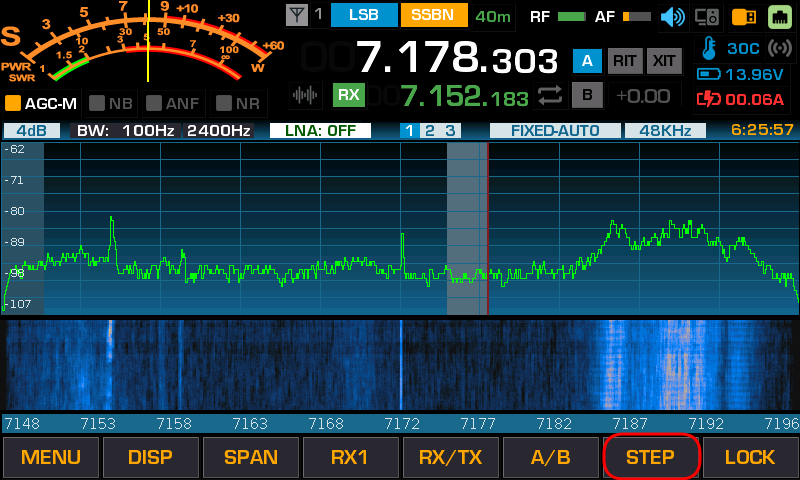
After the drop-down menu appears, select the desired mode, RIT or XIT:
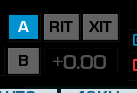
A gray indicator means that the detuning is turned off.
When the detuning mode is active, the LOCK button works. You can set the desired detuning value and press the LOCK button to prevent it from changing when you turn the tuning knob.
RIT - receiver detuning
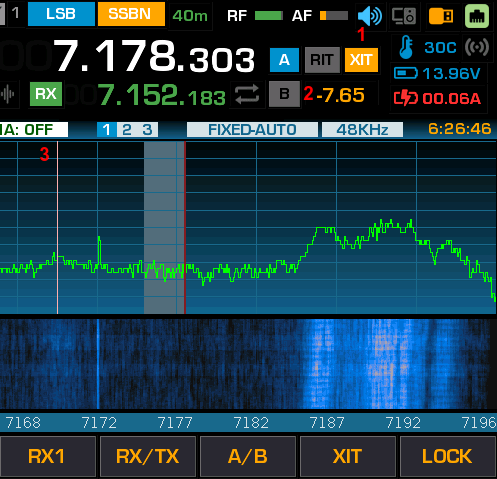
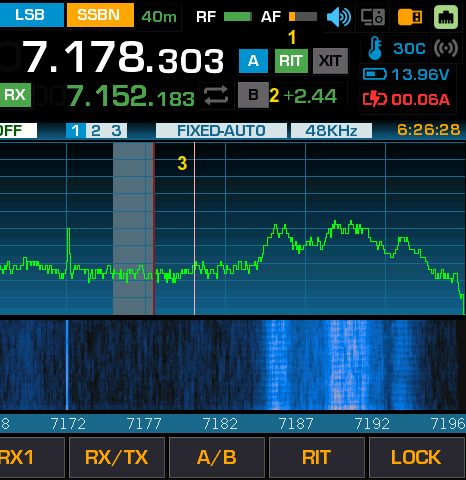
In this mode, the green RIT indicator (1) lights up and the detuning value (2) is displayed in green. When you turn the main tuning knob, an additional vertical line appears on the spectrum display, showing the current reception frequency. (3) The name of the STEP button changes to RIT Pressing and holding the F7 (RIT) button resets the detuning value, while pressing it briefly turns off RIT mode. The maximum detuning value is +-30 kHz.
В этом режим загорается оранжевый индикатор XIT (1) и значение расстройки (2) индицируется оранжевым цветом. При вращении основной ручки настройки на экране спектроскопа появляется дополнительная вертикальная линия, показывающая текущую частоту передатчика (3) Название кнопки STEP меняется на XIT Повторное длинное нажатие -кнопки F7 (XIT) - обнуляет значение расстройки, короткое - выключает режим XIT. Максимальное значение расстройки +-30КГц